¶ Hardware requirement:
- Internet-connected computer
- Neon-JNX or AI Dev Kit or EOS-JNX
¶ Software requirement:
Google account
¶ Purpose
This article will show you how to implete your vision AI application with Google Colab.
You will learn how to leverage the simplicity and convenience of EVA about:
- How to label your own dataset by Roboflow
- How to Take a pretrained model and train a YOLO v4 Tiny model with your own dataset
- Optimize AI model on edge devices
¶ Archtecture of Design
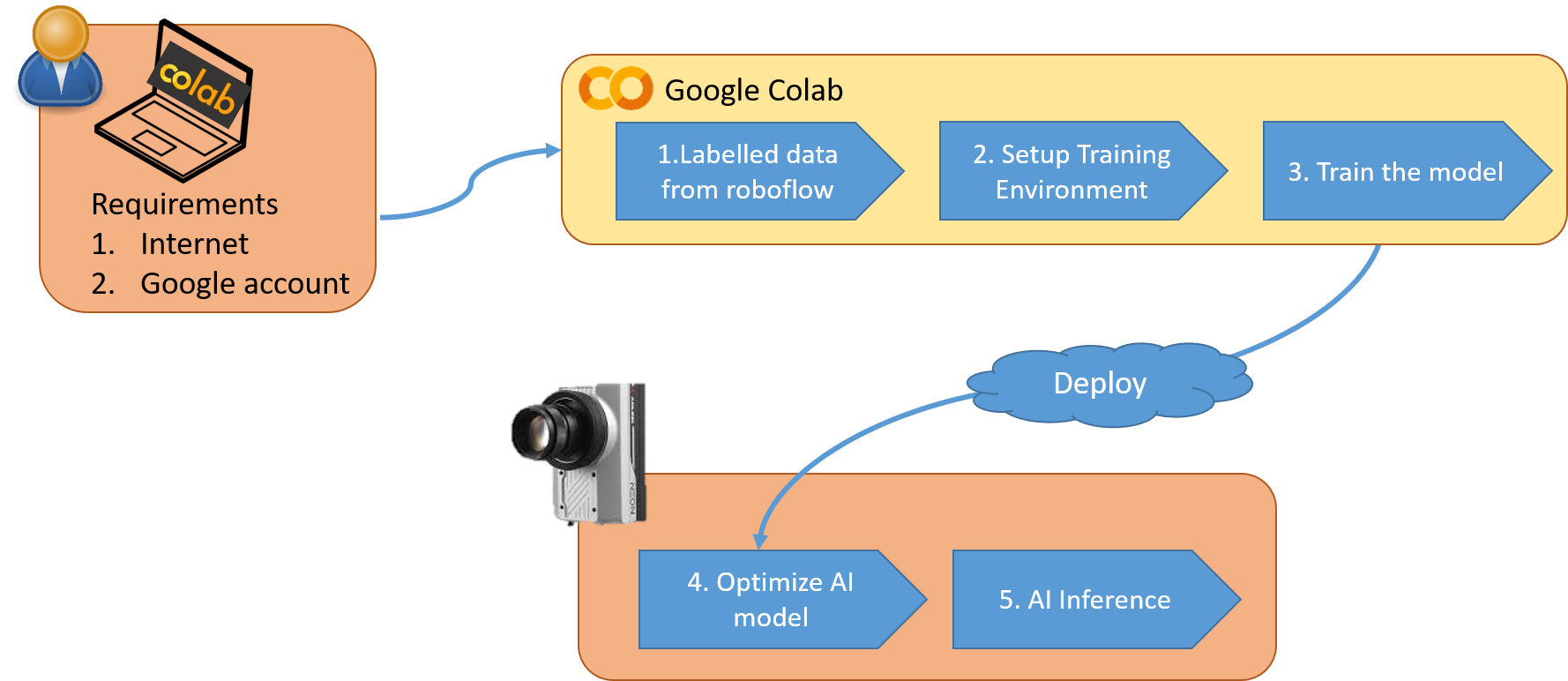
Before getting started, you will need an internet-connected computer and a Google account.
Open your browser and open the Google Colab link that ADLINK provided. Following the steps, you can train your own AI model on Google Colab and optimize it for inference on edge devices like Neon camera or EOS-JNX through deployment.
¶ What is Google Colab:
Google Colab, short for Google Colaboratory, is a cloud-based integrated development environment (IDE) provided by Google. It allows users to write, execute, and share Python code in a web browser, eliminating the need for local installations or setups. Google Colab provides a Jupyter Notebook-like interface and offers various features, including code editing, executing code cells, and displaying outputs such as text, images, and charts. It also provides access to GPU and TPU resources for running computationally intensive tasks, making it popular among machine learning practitioners and researchers for its ability to perform deep learning experiments efficiently. Google Colab allows for collaboration, as multiple users can work on the same notebook simultaneously and share their work with others.
https://www.youtube.com/embed/inN8seMm7UI