¶ What can you learn from this sample code?
Through this sample code, you can learn in C/C++:
- Establish a basic gstreamer filter element.
- Including declaration, construction, implementation, etc. All the detail guidances are described in the EVA SDK Programming Guide, Developing Elements/Plugins with C
- Video/Image processing in filter element.
- The difference between plugin and element.
- GStreamer pipeline stream flow mechanism.
¶ Essential knowledge
- Had already know how the gstreamer pipeline command is constructed.
- First read EVA SDK Programming Guide, Developing Elements/Plugins with C
- From GStreamer Tutorials: GStreamer is built on top of the GObject (for object orientation) and GLib (for common algorithms) libraries, which means that every now and then you will have to call functions of these libraries. Even though the GStreamer tutorials will make sure that deep knowledge of these libraries is not required, familiarity with them will certainly ease the process of learning GStreamer.
- Basic C/C++ programming.
¶ About this sample code
This sample shows how to generate a simple GStreamer video filter plugin and element through the GObject and GLib that GStreamer built on.
¶ Description
In this sample, there are seven main parts to build the element within a plugin, which are:
- Class declaration
- Constructors and Deconstructors
- Object life cycle
- Class implementation
- Sink/Source pad association
- Override GstVideoFilter method
- Plugin registration
Each step detail meaning could be found in the EVA SDK Programming Guide, Developing Elements/Plugins with C, here we only briefly introduce the main code in this sample code.
¶ Class declaration
Class declaration is declared in the header file. It contains 2 parts: (1) Casting Macros; (2) GObject register. For the Macross are those casting defined in GObject, follow the GObject define formats below:
#define AD_TYPE_FILTER_TEMPLATE (ad_filter_template_get_type())
#define AD_FILTER_TEMPLATE(obj) (G_TYPE_CHECK_INSTANCE_CAST((obj), AD_TYPE_FILTER_TEMPLATE, AdFilterTemplate))
#define AD_FILTER_TEMPLATE_CLASS(klass) (G_TYPE_CHECK_CLASS_CAST((klass), AD_TYPE_FILTER_TEMPLATE, AdFilterTemplateClass))
#define AD_IS_FILTER_TEMPLATE(obj) (G_TYPE_CHECK_INSTANCE_TYPE((obj), AD_TYPE_FILTER_TEMPLATE))
#define AD_IS_FILTER_TEMPLATE_CLASS(klass) (G_TYPE_CHECK_CLASS_TYPE((klass), AD_TYPE_FILTER_TEMPLATE))
These macros are used for object declaration, class/instance casting and type verification. The above are the required macro definitions for casting the GObject and must be defined between the G_BEGIN_DECLS and G_END_DECLS tags. It is common with GObject that the inherited functions and members are called or used.
Then the GObject system combines the two struct definitions at execution time below:
typedef struct _AdFilterTemplate AdFilterTemplate;
typedef struct _AdFilterTemplateClass AdFilterTemplateClass;
typedef struct _AdFilterTemplatePrivate AdFilterTemplatePrivate;

struct _AdFilterTemplate
{
  GstVideoFilter base;
  AdFilterTemplatePrivate *priv;
};

struct _AdFilterTemplateClass
{
  GstVideoFilterClass base_ad_filter_template_class;
};
These two struct definitions must have a typedef declaration with the same name without an underline—this is the format commonly used by GObject in GStreamer or other libraries. The private structure is defined in _AdFilterTemplatePrivate in .cpp in case of wrapping the source code.
GObject also requires defining the parent class and instance first in each class metadata structure and instance data structure. This will let GObject know which class declarations to inherit from. In this example, _AdFilterTemplate and _ADFilterTemplateClass both inherit from the parent classes GstVideoFilter and GstVideoFilterClass, respectively.
For register to GObject, define the GType:
GType ad_filter_template_get_type(void);
This step allows the GObject system to identify the class by returning GType and casting the result to the right class at execution time.
¶ Constructors and Deconstructors
The file adfiltertemplate.cpp implements the ad_filter_template_class_init and ad_filter_template_init constructors. When the class object memory is allocated, GInstanceInit() is called to initialize the class, then the constructors. When a class is going to be destroyed, the deconstructor will first be called. In the GObject, there is no clear connection between constructor and deconstructor. The GObject separates the deconstructor into dispose and finalize. If the class references another object, it is required to release the reference of that object in the dispose stage (refer to gst_object_unref for more details). In the finalize stage, all the allocated memory for this class is released.
¶ Object life cycle
Class initialization is only performed once when the class first used in the life cycle, and each instance of the class is individually initialized and destroyed in its life cycle. Once the class is not used, it is permanently destroyed. More detail could be refer to EVA SDK Programming Guide, Develop ing Elements/Plugins with C
¶ Class implementation
In the GObject, you are required to cast the type to the parent and assign the implemented function to perform an override.
¶ Casting in ad_filter_template_class_init
GObjectClass *gobject_class;
GstElementClass *gstelement_class;
GstVideoFilterClass *gstvideofilter_class;

gobject_class = (GObjectClass *)klass;
gstvideofilter_class = (GstVideoFilterClass *)klass;
gstelement_class = (GstElementClass *)klass;
¶ Override the Method of the Parent
Casting to the right parent to override the method you are going to use is the way that the GObject system runs. The class function or virtual function descriptions can be queried by the GStreamer API references.
For the GObjectClass in ad_filter_template_class_init, there are four main functions that must be implemented for the class:
- _set_property
- _get_property
- _dispose
- _finalize
gobject_class->set_property = ad_filter_template_set_property;
gobject_class->get_property = ad_filter_template_get_property;
gobject_class->dispose = ad_filter_template_dispose;
gobject_class->finalize = ad_filter_template_finalize;
¶ Implement Object Properties
The GObject implements a get/set mechanism for object properties. This mechanism allows the user to read through GObject's g_object_get_property or write data with g_object_set_property by knowing the name of the object property. The class supports this mechanism by registering each class property through g_object_class_install_property and overriding the _set_property and _get_property functions, For example:
  g_object_class_install_property(gobject_class, PROP_FILTER_TYPE,
                                  g_param_spec_int("type", "Type",
                                                   "Filter type 1.Edge 2.Gray", 0, 1,
                                                   DEFAULT_FILTER_TYPE, (GParamFlags)G_PARAM_READWRITE));

  g_object_class_install_property(gobject_class, PROP_EDGE_VALUE,
                                  g_param_spec_int("edge-value", "edge value",
                                                   "Threshold value for edge image", 0, 255,
                                                   DEFAULT_EDGE_VALUE, (GParamFlags)G_PARAM_READWRITE));
¶ Sink/Source pad association
There are two kinds of pads in GStreamer: sink and source. Both of them are created by the following steps.
¶ Pad Definition
Define sink or source pad factories under the GStreamer pad template. Be sure to define the name of the pad, the direction, presence, and capabilities.
static GstStaticPadTemplate sink_factory = GST_STATIC_PAD_TEMPLATE("sink",
                                                                   GST_PAD_SINK,
                                                                   GST_PAD_ALWAYS,
                                                                   GST_STATIC_CAPS(GST_VIDEO_CAPS_MAKE("{ BGR }")));

static GstStaticPadTemplate src_factory = GST_STATIC_PAD_TEMPLATE("src",
                                                                  GST_PAD_SRC,
                                                                  GST_PAD_ALWAYS,
                                                                  GST_STATIC_CAPS(GST_VIDEO_CAPS_MAKE("{ BGR }")));
¶ Adding a Pad
Add the factories into the class_init of the GObject class. Once the class has been initialized, the GStreamer factory is created.
  gst_element_class_add_pad_template(gstelement_class,
                                     gst_static_pad_template_get(&src_factory));
  gst_element_class_add_pad_template(gstelement_class,
                                     gst_static_pad_template_get(
                                     &sink_factory));
¶ Override GstVideoFilter method
The ad_filter_template, inherited from GstVideoFilter, is useful for focusing on the video algorithm without additional GStreamer tasks like negotiation, capability checks, or status checks. This element is focused on processing frame data, so it is suitable to inherit the parent GstVideoFilter class. To achieve this implementation, override the virtual method transform_frame_ip.
  gstvideofilter_class->transform_frame_ip =
      GST_DEBUG_FUNCPTR(ad_filter_template_transform_frame_ip);
In ad_filter_template_transform_frame_ip, GstVideoFilter passes the GstVideoFrame wrapper for the user to directly access the data related to the frame, unlike other GStreamer elements that pass the buffer directly. The buffer does not have to be parsed into the generic frame format.
static GstFlowReturn
ad_filter_template_transform_frame_ip(GstVideoFilter *filter,
                                      GstVideoFrame *frame)
{
  AdFilterTemplate *sample_filter = AD_FILTER_TEMPLATE(filter);
  GstMapInfo info;
  Mat output_image;
  int filter_type;
  int edge_threshold;

  gst_buffer_map(frame->buffer, &info, GST_MAP_READ);

  ad_filter_template_initialize_images(sample_filter, frame, info);

  AD_FILTER_TEMPLATE_LOCK(sample_filter);
  filter_type = sample_filter->priv->filter_type;
  edge_threshold = sample_filter->priv->edge_value;
  AD_FILTER_TEMPLATE_UNLOCK(sample_filter);

  if (filter_type == 0)
  {
    GST_DEBUG("Calculating edges");
    Canny((*sample_filter->priv->cv_image), output_image,
          edge_threshold, 255);
  }
  else if (filter_type == 1)
  {
    GST_DEBUG("Calculating black&white image");
    //cvtColor((*sample_filter->priv->cv_image), output_image, COLOR_YUV2BGR_I420);
    cvtColor((*sample_filter->priv->cv_image), output_image, COLOR_BGR2GRAY);
  }

  if (output_image.data != NULL)
  {
    GST_DEBUG("Updating output image");
    ad_filter_template_display_background(sample_filter, output_image);
  }

  gst_buffer_unmap(frame->buffer, &info);
  return GST_FLOW_OK;
}
gst_buffer_map and gst_buffer_unmap deal with the mapping tasks from frame data to info.map and unmap also deal with read/write management to ensure the data is exclusively occupied. In the example, the processing option filter_type decides what the process is going to do: 1 for color to gray; 0 for Canny edge detection. After the process is done, ad_filter_template_display_background will copy back to the frame referenced at the beginning. Then, the video frame buffer is passed downstream.
¶ Plugin registration
GStreamer uses a registration script to wrap elements into the plugin. The plugin is a .so file stored in the operating system accessed by GStreamer.
gboolean
ad_filter_template_plugin_init(GstPlugin *plugin)
{
  return gst_element_register(plugin, PLUGIN_NAME, GST_RANK_NONE,
                              AD_TYPE_FILTER_TEMPLATE);
}

// code omitted ...

GST_PLUGIN_DEFINE(
    GST_VERSION_MAJOR,
    GST_VERSION_MINOR,
    adfiltertemplate,
    "ADLINK filter template plugin",
    ad_filter_template_plugin_init,
    PACKAGE_VERSION,
    GST_LICENSE,
    GST_PACKAGE_NAME,
    GST_PACKAGE_ORIGIN)
So far, we have introduced the basic concepts of the GObject structure used in C and the way to implement a basic element in GStreamer. There are other kinds of the elements described in GStreamer such as the sink element, src element, and multi-Pad element which are implemented in a similar way. Refer to the Gstreamer API reference for more information on creating custom GStreamer elements.
¶ Run this sample code
Copy the built plugin libadfiltertemplate.so file to the plugin folder EVA installed, here used EVA_ROOT to preset the installed path of EVASDK. Then run the GStreamer tool to inspect it to see the metadata and the object information.
$ gst-inspect-1.0 adfiltertemplate
and you will see all of the information listed:
Factory Details:
  Rank                     none (0)
  Long-name                filter template element
  Klass                    Video/Filter
  Description              Example of filter with OpenCV operations
  Author                   Steven.Tu <steven.tu@adlinktech.com>

Plugin Details:
  Name                     adfiltertemplate
  Description              ADLINK filter template plugin
  Filename                 /opt/adlink/eva/plugins/libadfiltertemplate.so
  Version                  1.0
  License                  LGPL
  Source module            SAMPLE
  Binary package           Sample Package
  Origin URL               https://www.adlink.com

// more information omitted
Then you can run the pipeline command for testing:
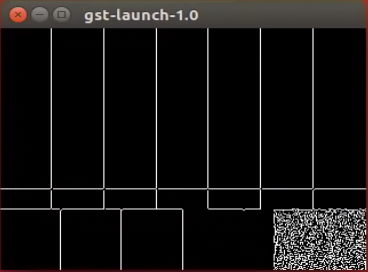
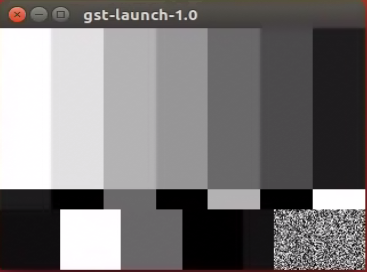
$ gst-launch-1.0 videotestsrc ! videoconvert ! adfiltertemplate type=0 ! videoconvert ! ximagesink
"type" is the property designed in adfiltertemplate element. We can inspect it to see the property description below:
$ gst-inspect-1.0 adfiltertemplate
// more information omitted
  type                : Filter type 0.Edge 1.Gray
                        flags: readable, writable
                        Integer. Range: 0 - 1 Default: 0
// more information omitted
So that for edge detect just set type to 0 and gray to 1. for type=0. For different type value, the results are:
| type 0 | type 1 |
|---|---|
 |
 |