¶ What can you learn from this sample code?
Through this sample code, you can learn:
- Establish a basic gstreamer filter element.
- Including declaration, construction, implementation, etc. All the detail guidances are described in the EVA SDK Programming Guide, Developing Elements/Plugins with Python. [Note that in EVA SDK Programming Guide, Developing Elements/Plugins with Python uses the sample code, classifier_sample.py, as example. Here we uses more simple one,
video-filter.py, as example. But they are very alike in code structure.]
- Video/Image processing in filter element.
- The difference between plugin and element.
- GStreamer pipeline stream flow mechanism.
¶ Essential knowledge(What user need to know before learn this sample)
- Had already know how the gstreamer pipeline command is constructed.
- First read EVA SDK Programming Guide, Developing Elements/Plugins with Python
- From GStreamer Tutorials: GStreamer is built on top of the GObject (for object orientation) and GLib (for common algorithms) libraries, which means that every now and then you will have to call functions of these libraries. Even though the GStreamer tutorials will make sure that deep knowledge of these libraries is not required, familiarity with them will certainly ease the process of learning GStreamer.
- Basic Python programming.
¶ About this sample code
This sample shows how to generate a simple GStreamer video filter plugin and element through the GObject and GLib that GStreamer built on.
¶ Description
Relative to programming in C, it is easier to develop elements/plugins in Python. The following uses the video_filter element as an example. There are four main parts to build the element within a plugin, which are:
-
Import Glib Module
-
Class Declaration
-
Class Implementation
-
Register Python Element
Each step detail meaning could be found in the EVA SDK Programming Guide, Developing Elements/Plugins with Python, here we only briefly introduce the main code blocks in this sample code. [Note that in EVA SDK Programming Guide, Developing Elements/Plugins with Python uses the sample code, classifier_sample.py, as example. Here we uses more simple one,
video-filter.py, as example. But they are very alike in code structure.]
¶ Import Glib Module
GStreamer is built on Glib and GObject which are compatible across platforms and programming languages. However, the following modules must still be included.
from gi.repository import Gst, GObject, GLib, GstVideo
Developing a GStreamer application in Python requires a Gst version and initialization before using the Gst function because the GStreamer Python element loader will handle this step.
import gi
gi.require_version('Gst', '1.0')
from gi.repository import Gst, GObject
Gst.init([])
¶ Class Declaration
Defines the class and inherits a subclass of Gst.Element.
class VideoFilter(Gst.Element):
¶ Class Implementation
¶ Initialize Class Metadata
class VideoFilter(Gst.Element):
    # MODIFIED - Gstreamer plugin name
    GST_PLUGIN_NAME = 'video_filter'

    __gstmetadata__ = ("Video Filter",
                       "GstElement",
                       "Python based GStreamer videofilter example",
                       "Dr. Paul Lin <paul.lin@adlinktech.com>")

    __gsttemplates__ = (Gst.PadTemplate.new("src",
                                            Gst.PadDirection.SRC,
                                            Gst.PadPresence.ALWAYS,
                                            Gst.Caps.from_string(gst_video_caps_make("{ BGR }"))),
                        Gst.PadTemplate.new("sink",
                                            Gst.PadDirection.SINK,
                                            Gst.PadPresence.ALWAYS,
                                            Gst.Caps.from_string(gst_video_caps_make("{ BGR }"))))

    _sinkpadtemplate = __gsttemplates__[1]
    _srcpadtemplate = __gsttemplates__[0]

    # MODIFIED - Gstreamer plugin properties
    __gproperties__ = {
      "type": (int,                         # type
               "Type",                      # nick
               "Filter type 0.Edge 1.Gray", # blurb
               0,                           # min
               1,                           # max
               0,                           # default
               GObject.ParamFlags.READWRITE # flags
              ),
      "edge-value": (int,                               # type
                     "Edge-Value",                      # nick
                     "Threshold value for edge image",  # blurb
                     0,                                 # min
                     255,                               # max
                     125,                               # default
                     GObject.ParamFlags.READWRITE       # flags
                    )
    }
    ......
¶ Initialize Class Instance
Initialize properties before base class initialization.
class VideoFilter(Gst.Element):
......
def __init__(self):
      # MODIFIED - Setting gstreamer plugin properties default value
      # Note - Initialize properties before Base Class initialization
      self.edge_value = 125
      self.filter_type = 0

      super(VideoFilter, self).__init__()
......
¶ Sink and src Pad Association
New sink and src pads from template, including register callbacks for events, queries, or dataflow on the pads.
class VideoFilter(Gst.Element):
    ......
    def __init__(self):
          ......
          self.sinkpad = Gst.Pad.new_from_template(self._sinkpadtemplate, 'sink')
          self.sinkpad.set_chain_function_full(self.chainfunc, None)
          self.sinkpad.set_chain_list_function_full(self.chainlistfunc, None)
          self.sinkpad.set_event_function_full(self.eventfunc, None)
          self.add_pad(self.sinkpad)

          self.srcpad = Gst.Pad.new_from_template(self._srcpadtemplate, 'src')
          self.add_pad(self.srcpad)
¶ Override set and get Property Function
Override property function to implement get and set property features.
class VideoFilter(Gst.Element):
    ......
    def __init__(self):
        ......
    def do_get_property(self, prop: GObject.GParamSpec):
        # MODIFIED - Gstreamer plugin properties getting
        ......
    def do_set_property(self, prop: GObject.GParamSpec, value):
        # MODIFIED - Gstreamer plugin properties setting
        ......
¶ Implement Chain Function
When a sink pad pushes the buffer, then pad will call the chainfunc callback function. Implement logical frame operations in this function and push the buffer into the src pad to pass the buffer into the next element.
class VideoFilter(Gst.Element):
      ......
      def chainfunc(self, pad: Gst.Pad, parent, buff: Gst.Buffer) -> Gst.FlowReturn:
            # Implement your frame operate logical here
¶ Register Python Element
You need to register the Python element after implementing the element class, and then GStreamer can scan the element.
# Register plugin to use it from command line
GObject.type_register(VideoFilter)
__gstelementfactory__ = (VideoFilter.GST_PLUGIN_NAME,
                         Gst.Rank.NONE, VideoFilter)
The Python element must define the gstelementfactory variable because the GStreamer Python loader will scan all Python modules in the plugin path and check whether this module defines gstelementfactory. Modules that do not implement the variable can be skipped.
After the python plugin is implemented, it should be installed into the EVA package. Usually, GStreamer scans plugins under the GST_PLUGIN_PATH environment variable. However, Python elements must be installed in the "python" folder under GST_PLUGIN_PATH. In the example below, the GST_PLUGIN_PATH is /plugins. Copy your python plugin code under this plugin folder:
plugins
├── libadfiltertemplate.so
├── ...
├── libpylonsrc.so
└── python
    ├── ...
    └── classifier_sample.py
    └── video-filter.py ("Your designed python plugin. Here, we copy video-filter.py as exampl)
Finally, source the python plugin for new added python plugin:
source /opt/adlink/eva/scripts/setup_eva_envs.sh
rm ~/.cache/gstreamer-1.0/registry* # Strongly suggest to run this command while debugging
¶ **Important Note: **
While you are executing your python plugin with errors after place it in python folder, your plugin will be blocked by GStreamer. Don not forget to remove the GStreamer chache every time you met error in debugging:
rm ~/.cache/gstreamer-1.0/registry*
¶ Run this sample code
After installing the python plugin video-filter.py to the plugin folder, here used EVA_ROOT to preset the installed path of EVASDK, run the GStreamer tool to inspect it to see the metadata and the object information.
$ gst-inspect-1.0 video_filter
and you will see all of the information listed:
Factory Details:
  Rank                     none (0)
  Long-name                Video Filter
  Klass                    GstElement
  Description              Python based GStreamer videofilter example
  Author                   Dr. Paul Lin <paul.lin@adlinktech.com>

Plugin Details:
  Name                     python
  Description              loader for plugins written in python
  Filename                 /usr/lib/x86_64-linux-gnu/gstreamer-1.0/libgstpython.so
  Version                  1.14.5
  License                  LGPL
  Source module            gst-python
  Binary package           GStreamer Python
  Origin URL               http://gstreamer.freedesktop.org

// more information omitted
Then you can run the pipeline command for testing:
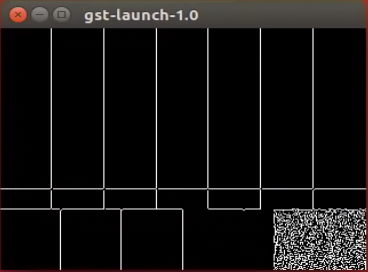
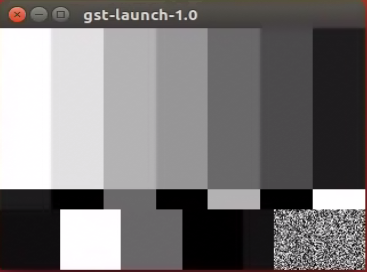
$ gst-launch-1.0 videotestsrc ! video_filter type=0 ! videoconvert ! ximagesink
"type" is the property designed in adfiltertemplate element. We can inspect it to see the property description below:
$ gst-inspect-1.0 video_filter
// more information omitted
  type                : Filter type 0.Edge 1.Gray
                        flags: readable, writable
                        Integer. Range: 0 - 1 Default: 0
// more information omitted
So that for edge detect just set type to 0 and gray to 1. for type=0. For different type value, the results are:
| type 0 | type 1 |
|---|---|
 |
 |